Updated for 2026

Top TimeTabler AlternativesYou Should Consider in 2026

Compare TimeTabler alternatives in 2026 including TimetableMaster, aSc Timetables, Untis, PrimeTimetable, and FET for school scheduling needs.

Exploring alternatives to TimeTabler? Compare the top 5 school scheduling solutions with AI-assisted features and web-based access.

5
Alternatives Reviewed
2026
Latest Rankings
Free
Options Available

Quick Answer: Top TimeTabler Alternative

TimetableMaster is a popular TimeTabler alternative in 2026. TimeTabler (used by 1,000+ UK schools in 90 countries for 40+ years, as reported) is a respected desktop solution with strong UK curriculum integration. TimetableMaster takes a different approach with AI-assisted scheduling, web-based access, and a free tier, used by thousands of schools in 100+ countries.

Both tools have their strengths. TimeTabler is well-established with deep UK school integration. TimetableMaster offers a cloud-based, AI-assisted approach with web access from any device. Schools worldwide use both depending on their specific needs and context.

Who This Page Helps - Global Schools & Districts

  • K-12 schools and school districts worldwide
  • Secondary schools, academies, and international schools
  • Public and private institutions across multiple education systems (GDPR compliant for EU schools)
  • Universities, colleges, and vocational institutes
  • Schools following national, international, IB, Cambridge, and local curricula

What is TimeTabler?

TimeTabler is a UK-based desktop timetabling software that has been serving schools since 1978 (based on publicly available information). With over 40 years of history, it is reported to be used by 1,000+ schools across 90 countries, primarily in the UK education system.

The software is primarily designed for Windows desktop environments and offers a combination of automatic and manual scheduling features. It uses an annual subscription pricing model (based on publicly available information).

TimeTabler remains a respected choice with strong UK school integration and decades of refinement. Some institutions also explore additional tools to compare approaches to web-based access, AI-assisted scheduling, and pricing models.

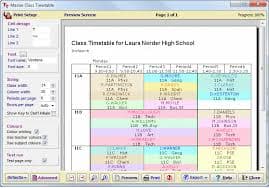
TimeTabler UK desktop scheduling software interface for schools

Illustrative example of a scheduling interface

Top 5 TimeTabler Alternatives in 2026

We've reviewed popular alternatives based on features, ease of use, pricing, and user feedback.

Featured Alternative
#1

TimetableMaster

Featured: AI-Assisted Cloud Scheduling

AI-assisted timetable software designed to help reduce scheduling conflicts. Web-based platform accessible from any device. Used by thousands of schools in 100+ countries.

Strengths

  • AI-assisted scheduling designed to help reduce conflicts
  • Web-based — no installation required
  • Free tier available for small schools
  • Mobile app + responsive web access
  • 24/7 accessibility from any device
  • Export to PDF, Excel, Google Calendar

Considerations

  • Requires internet connection

Pricing: Free tier available • Region-friendly pricing for schools worldwide

Compare TimetableMaster vs TimeTabler →
Try Free
#2

aSc Timetables

The Global Industry Standard

One of the most widely used school scheduling tools with over 30 years of development, reported to be used by many schools across 173 countries (based on publicly available information). Offers both desktop software and EduPage online platform.

Strengths

  • Reported to be used by many schools worldwide
  • Both desktop and EduPage online platform available
  • Automatic timetable generator
  • Supports 10+ languages

Considerations

  • Desktop and EduPage are separate workflows
  • Traditional heuristic-based scheduling approach
  • Interface can feel complex for new users

Pricing: License-based tiered pricing (based on publicly available information)

#3

Untis

The European Integration Leader

Established timetabling software popular in European schools with comprehensive scheduling features, substitution management, and the WebUntis cloud platform with mobile app.

Strengths

  • Comprehensive feature set
  • Strong presence in European schools (26,000+ institutions, reported)
  • WebUntis cloud platform and mobile app
  • Available in 35+ languages

Considerations

  • Multi-product ecosystem (Untis, WebUntis, vUntis)
  • May require more training for advanced features

Pricing: Quote-based (based on publicly available information)

#4

PrimeTimetable

The Visual Web-Based Option

Web-based scheduling tool with a visual drag-and-drop interface, designed for schools that prefer hands-on scheduling control directly in the browser.

Strengths

  • Visual drag-and-drop interface
  • Web-based access from any browser
  • Intuitive design for manual scheduling

Considerations

  • Primarily manual scheduling approach
  • May have limitations for very large institutions

Pricing: Typically subscription-based (based on publicly available information)

#5

FET

The Open-Source Budget Option

Free, open-source automatic timetable generator with a constraint-based algorithm. Cross-platform (Windows, Mac, Linux) and community-supported.

Strengths

  • Completely free (GNU AGPL)
  • Open-source and cross-platform
  • Constraint-based generation algorithm

Considerations

  • Traditional user interface
  • Community support only
  • No web or mobile access

Pricing: Free (open-source)

What to Consider When Evaluating Timetable Software

Key factors to evaluate when comparing scheduling solutions for your school in 2026.

Pricing Model

Scheduling software ranges from premium annual subscriptions to free tiers and open-source options. Consider total cost of ownership including updates, support, and any per-module fees.

Cloud vs Desktop Access

Some tools are desktop-centered (sometimes requiring virtualization for Mac), while others offer web-native access from any device. Consider your team's need for remote collaboration and mobile access.

Scheduling Approach

Tools differ in their approach: some combine manual and automated scheduling with traditional algorithms, while others use AI-assisted optimization. Evaluate which approach matches your scheduling complexity.

Regional vs Global Focus

Some tools are designed primarily for specific education systems (e.g., UK curriculum), while others support diverse curricula and scheduling models worldwide. Choose based on your school's context.

Quick Comparison: TimeTabler vs TimetableMaster

FeatureTimeTablerTimetableMaster
PlatformPrimarily desktop (Windows)Web, Mobile App & Desktop
Scheduling ApproachAuto + manual hybridAI-assisted optimization
User Base1,000+ schools Thousands of schools globally
Mobile AccessDesktop-centered workflowMobile app + responsive web
Mac SupportPrimarily WindowsNative web access
Region FocusPrimarily UKGlobal (100+ countries)

* Comparison based on publicly available information at the time of writing. Features and pricing may vary. We recommend verifying details directly with each vendor.

Frequently Asked Questions

Common questions about TimeTabler alternatives

What are the top alternatives to TimeTabler?

Popular TimeTabler alternatives in 2026 include TimetableMaster (AI-assisted cloud scheduling), aSc Timetables (established desktop tool with EduPage), Untis (European integration with WebUntis), PrimeTimetable (visual web-based editor), and FET (free open-source). Each tool has different strengths depending on your school's needs.

Is there a free alternative to TimeTabler?

Yes. TimetableMaster offers a free tier for small schools with AI-assisted scheduling. FET is completely free open-source software that runs on Windows, Mac, and Linux. Both are popular options for schools exploring alternatives with different pricing models.

What do schools consider when evaluating TimeTabler alternatives?

Schools typically consider platform accessibility (desktop vs web-based), scheduling approach (manual/hybrid vs AI-assisted), pricing model, regional focus (UK-specific vs global), and cross-platform support. The right fit depends on your scheduling complexity and budget.

Can I import my TimeTabler data into another software?

Many scheduling tools support data import via CSV or Excel formats. TimetableMaster supports data import and offers migration assistance. Many schools migrate quickly, though timelines depend on data complexity. Check with your preferred alternative for specific import capabilities.

Which TimeTabler alternatives work on Mac?

TimetableMaster is web-based and works on Mac, Windows, Linux, Chromebook, and mobile devices without installation. FET runs natively on Mac as open-source software. PrimeTimetable is also browser-based. Untis offers WebUntis for browser-based access alongside its desktop application.

How do TimeTabler alternative pricing models compare?

Scheduling software pricing varies widely. TimetableMaster offers a free tier and subscription plans. aSc Timetables uses license-based pricing. Untis uses quote-based pricing. FET is completely free. TimeTabler uses annual subscription pricing (based on publicly available information). Evaluate total cost based on your school's specific needs.

Ready to Explore a Modern Scheduling Solution?

Join thousands of schools using TimetableMaster. Experience AI-assisted scheduling in a web-based platform designed for quick setup and ease of use.

Explore how TimetableMaster's AI-assisted, cloud-based approach compares to traditional desktop scheduling tools. Start with our free tier and see if it's the right fit for your school.

No credit card required • Free tier available • Import your data easily

Disclaimer: TimeTabler is a trademark of its respective owner. All other product names, logos, and brands mentioned on this page are the property of their respective owners. This page is provided for informational and comparison purposes only. TimetableMaster is not affiliated with, endorsed by, or sponsored by TimeTabler or any other company mentioned on this page. Product information, features, and pricing are based on publicly available information and may change without notice. Feature comparisons reflect general product positioning and may vary by configuration. We recommend verifying details directly with each vendor.

Chat with us