Updated for 2025

Best FET Timetable AlternativesYou Should Consider in 2025

TimetableMaster is the best FET alternative in 2025 for schools seeking a modern, web-based timetable solution with AI-powered scheduling and no technical setup required.

Compare the top 5 modern school scheduling solutions trusted by schools worldwide. Web-based, AI-powered alternatives to FET.

5
Alternatives Reviewed
2025
Latest Rankings
Web
Based Options

Quick Answer: Best FET Alternative

TimetableMaster is the best FET alternative in 2025. FET (Free Timetabling Software) is free under GNU AGPL license, but processing can take 20+ minutes for moderate schedules and hours for complex ones. TimetableMaster offers a modern web-based interface, AI-powered scheduling, and generates conflict-free timetables in under 3 minutes-without technical setup. Trusted by 45,000+ institutes in 100+ countries.

FET is actively maintained open-source software, but remains desktop-only with no cloud access. For schools wanting web-based scheduling with professional support, TimetableMaster provides a simpler solution with a free tier. Used by schools across North America, Europe, Asia-Pacific, Africa, and Latin America.

Who This Page Helps - Global Schools & Districts

  • K-12 schools and school districts worldwide
  • Secondary schools, academies, and international schools
  • Public and private institutions across multiple education systems (GDPR compliant for EU schools)
  • Universities, colleges, and vocational institutes
  • Schools following national, international, IB, Cambridge, and local curricula

What is FET?

FET (Free Timetabling Software) is an open-source automatic timetable generator released under the GNU AGPL v3 license. It's been a popular choice for schools and universities looking for a free scheduling solution.

The software uses a constraint-based algorithm to generate timetables automatically. However, processing times can range from seconds to hours depending on the complexity of the schedule and constraints configured.

While FET is free and actively maintained, it's desktop-only with no web or mobile access, requires technical knowledge to configure constraints properly, and relies on community support through forums and guestbooks.

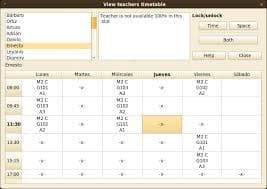
FET free timetabling software desktop interface

FET interface

Top 5 FET Alternatives in 2025

We've reviewed and ranked the best alternatives based on ease of use, modern features, web access, and overall value.

Recommended Alternative
#1

TimetableMaster

Best Overall Alternative

AI-powered timetable software that generates conflict-free schedules in under 3 minutes. Modern web-based interface accessible from any device. Trusted by 45,000+ institutes in 100+ countries.

Pros

  • Advanced AI scheduling with automatic conflict resolution
  • Modern, intuitive web-based interface
  • No technical knowledge required
  • Free tier available for small schools
  • Mobile-responsive - access from any device
  • Cloud sync and real-time collaboration
  • GDPR compliant for European schools

Cons

  • Requires internet connection

Best for: Schools wanting a modern, easy-to-use FET replacement

Pricing: Free tier available • Region-friendly pricing for schools worldwide

Try Free
#2

PrimeTimetable

Web-Based Option

Web-based scheduling software with a visual drag-and-drop interface for creating school timetables.

Pros

  • Web-based access
  • Visual interface
  • Easier than FET to learn

Cons

  • Limited AI automation
  • Manual conflict resolution
  • Subscription pricing

Best for: Schools wanting basic web-based scheduling

Pricing: Subscription-based

#3

ascTimetables

Desktop Alternative

Desktop-based scheduling software with comprehensive features for creating school timetables. Popular in European markets.

Pros

  • Comprehensive feature set
  • Works offline after installation
  • Established track record

Cons

  • Requires desktop installation (like FET)
  • No cloud sync or web access
  • Limited mobile support
  • Paid license required

Best for: Schools preferring desktop software with more features than FET

Pricing: One-time license purchase

#4

Untis

Popular in Europe

Established timetabling software popular in European schools with comprehensive scheduling features.

Pros

  • Comprehensive feature set
  • Strong presence in Europe
  • Substitution management

Cons

  • Steep learning curve (similar to FET)
  • Desktop-based installation
  • Higher price point
  • Complex interface

Best for: Large European institutions with dedicated IT support

Pricing: Contact for pricing

#5

TimeTabler

UK-Focused Solution

Timetabling software designed specifically for UK schools and their scheduling requirements.

Pros

  • Designed for UK curriculum
  • Good customer support
  • Integration with UK school systems

Cons

  • UK-focused features may not suit other regions
  • Desktop installation required
  • Higher cost than FET

Best for: Schools following UK curriculum or similar education systems

Pricing: Contact for pricing

Why Schools Are Switching from FET

Common reasons why educational institutions are looking for FET alternatives in 2025.

Long Processing Times

FET can take anywhere from seconds to 20 minutes for moderate timetables, and hours for complex schedules. TimetableMaster generates optimized timetables in under 3 minutes using advanced AI.

Technical Setup Required

FET (Free Timetabling Software) is powerful but requires technical knowledge to configure constraints properly. Modern alternatives like TimetableMaster are designed for ease of use without IT expertise.

Desktop-Only, No Cloud

FET is desktop software with no web access or cloud sync. You cannot access timetables from a phone, tablet, or another computer without manual file transfers.

Community-Only Support

As GNU AGPL-licensed open-source software, FET relies on community guestbooks and forums. Commercial alternatives provide dedicated customer support and documentation.

Quick Comparison: FET vs TimetableMaster

FeatureFETTimetableMaster
PlatformDesktop only (Win/Linux/macOS)Web, Mobile App & Desktop
Generation TimeSeconds to hoursNear-instant
User InterfaceTechnical/ComplexModern/Intuitive
Learning CurveSteep (constraint setup)Minimal
AlgorithmConstraint-basedAdvanced AI
Mobile AccessNoneMobile app + responsive web
Cloud SyncNone (local files)Real-time sync
SupportCommunity guestbookDedicated support
License/PriceGNU AGPL v3 (Free)Free tier available
User BaseOpen source community45,000+ institutes

Frequently Asked Questions

Common questions about FET alternatives

What is the best alternative to FET timetable software?

TimetableMaster is considered the best FET alternative in 2025. While FET is free open-source software under GNU AGPL license, TimetableMaster offers a modern web-based interface, AI-powered scheduling, and automatic conflict resolution. FET can take 20+ minutes for complex schedules; TimetableMaster generates timetables in under 3 minutes.

Is there a web-based alternative to FET?

Yes, TimetableMaster and PrimeTimetable are both web-based alternatives to FET. FET is desktop-only software requiring installation. Web-based solutions work in any browser, offer cloud sync, mobile access, and collaborative features without manual file transfers.

Why are schools switching from FET to other software?

Schools switch from FET due to long processing times (seconds to hours depending on complexity), technical setup requirements, desktop-only access with no cloud sync, and community-only support. While FET is free, the time investment often exceeds the cost of modern alternatives like TimetableMaster.

Can I import my FET data into another timetable software?

Yes, you can export your FET data (classes, teachers, rooms, constraints) and import it into modern alternatives via CSV or Excel files. TimetableMaster offers free migration support to help schools transition smoothly, with most completing migration within 1-2 days.

How does FET compare to TimetableMaster for speed?

FET uses a "fast and efficient algorithm" but processing time ranges from seconds to 20 minutes for moderate timetables, and can take hours for extremely difficult schedules. TimetableMaster AI generates optimized, conflict-free timetables in under 3 minutes consistently.

Is FET still being updated?

Yes, FET is actively maintained as open-source software under GNU AGPL v3 license. However, it remains desktop-only with no web or mobile access. For schools wanting modern cloud-based scheduling with professional support, TimetableMaster offers a free tier with significantly better usability.

Ready to Upgrade from FET?

Join 45,000+ institutes using TimetableMaster. Get modern web-based scheduling with AI automation-no technical knowledge required.

Final verdict: If you've struggled with FET's complexity or limitations, TimetableMaster offers the modern, user-friendly alternative with powerful AI scheduling.

No credit card required • Free tier available • Import your FET data easily