Updated for 2026

Best Lantiv Timetabler AlternativesYou Should Consider in 2026

TimetableMaster is the best Lantiv Timetabler alternative in 2026 for schools seeking AI-powered, cloud-based timetable generation with mobile access.

Looking for a modern replacement for Lantiv Timetabler? Compare the top 5 school scheduling solutions with AI-powered features, cloud access, and mobile apps.

5
Alternatives Reviewed
2026
Latest Rankings
Free
Options Available

Quick Answer: Best Lantiv Timetabler Alternative

TimetableMaster is the best Lantiv Timetabler alternative in 2026. While Lantiv is a desktop scheduling tool from the Netherlands used primarily in European schools with a visual editor and rotating timetable support, TimetableMaster provides advanced AI scheduling that generates optimized timetables in under 3 minutes with full cloud access and mobile apps. Trusted by 45,000+ institutes in 120+ countries.

Lantiv Timetabler is a capable desktop tool for European scheduling, but it is Windows-only with no cloud access or mobile app. TimetableMaster offers a modern, AI-powered alternative that works on any device and supports schools across North America, Europe, Asia-Pacific, Africa, and Latin America.

Who This Page Helps - Global Schools & Districts

  • K-12 schools and school districts worldwide
  • Secondary schools, academies, and international schools
  • Public and private institutions across multiple education systems (GDPR compliant for EU schools)
  • Universities, colleges, and vocational institutes
  • Schools following national, international, IB, Cambridge, and local curricula

What is Lantiv Timetabler?

Lantiv Timetabler is a desktop scheduling tool developed in the Netherlands, designed primarily for European schools. It features a visual scheduling interface that allows administrators to build timetables using drag-and-drop functionality and supports complex European scheduling models including rotating timetables.

The software is popular in the Netherlands, Belgium, and the UK, and is known for handling the intricacies of European-style scheduling. It uses a one-time purchase pricing model and runs exclusively on Windows desktop computers.

While Lantiv Timetabler has been a reliable choice for European schools, many institutions are now seeking modern alternatives with cloud access, mobile apps, AI-powered scheduling, and cross-platform support to meet the demands of today's connected education environment.

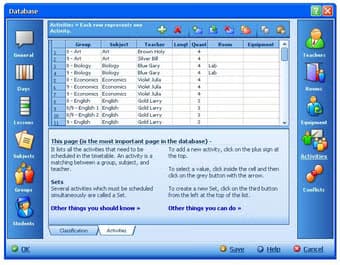
Lantiv Timetabler desktop scheduling software interface for European schools

Lantiv Timetabler interface

Top 5 Lantiv Timetabler Alternatives in 2026

We've reviewed and ranked the best alternatives based on features, ease of use, pricing, and user feedback.

Recommended Alternative
#1

TimetableMaster

Best Overall Alternative

AI-powered timetable software that generates conflict-free schedules in under 3 minutes. Trusted by 45,000+ institutes in 120+ countries with full cloud access and mobile app.

Pros

  • Advanced AI scheduling with automatic conflict resolution
  • Web-based - no installation required, works on any device
  • Free tier available for small schools
  • Mobile app for iOS & Android
  • 24/7 cloud accessibility from anywhere
  • Export to PDF, Excel, Google Calendar

Cons

  • Requires internet connection

Best for: Schools of all sizes looking for modern, AI-powered scheduling

Pricing: Free tier available, paid plans from $49/year

Try Free
#2

aSc Timetables

Established Desktop + Online Option

One of the most widely used school scheduling tools, serving 150,000+ schools across 173 countries with both desktop and online versions.

Pros

  • Used by 150,000+ schools worldwide
  • Both desktop and online versions available
  • Automatic timetable generator
  • Supports 10+ languages

Cons

  • Desktop and online versions are separate workflows
  • Tiered pricing ($149-$699) with add-on costs
  • Interface feels dated
  • Limited AI optimization

Best for: Schools wanting a proven solution with large user base

Pricing: $149-$699 one-time purchase

#3

PrimeTimetable

Good Web-Based Option

Web-based scheduling tool with a visual drag-and-drop interface, well suited for smaller schools that prefer manual scheduling control.

Pros

  • Visual drag-and-drop interface
  • Web-based access from any browser
  • Basic automation features

Cons

  • No AI-powered scheduling
  • Limited customization options
  • Can be expensive for larger schools

Best for: Small schools preferring manual control over schedules

Pricing: Subscription-based pricing

#4

Untis

Popular in Europe

Established timetabling software popular in European schools with comprehensive scheduling features and strong substitution management.

Pros

  • Comprehensive feature set
  • Strong presence in European schools
  • Advanced substitution management
  • Supports complex European scheduling models

Cons

  • Steep learning curve
  • Desktop-based installation
  • Higher price point
  • Complex interface not beginner-friendly

Best for: Large European institutions with dedicated IT support

Pricing: Contact for pricing

#5

FET

Free Open-Source Option

Free, open-source automatic timetable generator that runs on Windows, Mac, and Linux. Community-supported with no commercial backing.

Pros

  • Completely free and open-source
  • Cross-platform (Windows, Mac, Linux)
  • Automatic generation algorithm
  • Active community support

Cons

  • Dated user interface
  • No cloud sync or web access
  • Community support only - no official help desk
  • Technical knowledge required for setup

Best for: Tech-savvy schools with limited budgets

Pricing: Free (open-source)

Why Schools Are Switching from Lantiv Timetabler

Common reasons why educational institutions are looking for Lantiv Timetabler alternatives in 2026.

Desktop-Only Limitation

Lantiv Timetabler is a desktop application with no cloud access. You must be at a specific computer to work on your timetable. TimetableMaster is 100% cloud-based, accessible from any device, anywhere.

Limited to Windows

Lantiv only runs on Windows - no Mac or mobile support. TimetableMaster works on any device with a browser and offers dedicated iOS and Android apps for on-the-go scheduling.

Regional Focus

Lantiv Timetabler is primarily designed for European and Dutch schools. TimetableMaster serves 45,000+ institutes across 120+ countries with flexible scheduling models for any curriculum.

No Free Plan

Lantiv requires an upfront purchase with no free tier or trial. TimetableMaster offers a permanent free plan for small schools, so you can try before you commit.

Quick Comparison: Lantiv Timetabler vs TimetableMaster

FeatureLantiv TimetablerTimetableMaster
PlatformDesktop (Windows)Web, Mobile App & Desktop
SchedulingVisual editorAdvanced AI optimization
Cloud AccessNoYes (100% cloud)
Mobile AppNoYes (iOS & Android)
Free PlanNoYes (free tier)
Region FocusEurope/NetherlandsGlobal (120+ countries)
Rotating TimetablesYesYes
Substitute ManagementLimitedBuilt-in

Frequently Asked Questions

Common questions about Lantiv Timetabler alternatives

What is the best alternative to Lantiv Timetabler?

TimetableMaster is considered the best Lantiv Timetabler alternative in 2026. While Lantiv offers a visual desktop scheduling interface popular in European schools, TimetableMaster provides more advanced AI scheduling that generates optimized timetables in under 3 minutes. Unlike Lantiv, TimetableMaster is fully cloud-based with a mobile app, works on any device, and is trusted by 45,000+ institutes in 120+ countries.

Is there a free alternative to Lantiv Timetabler?

Yes. TimetableMaster offers a permanent free tier for small schools with AI-powered scheduling and cloud access. FET is a completely free, open-source timetabling tool that runs on Windows, Mac, and Linux. Lantiv Timetabler requires an upfront purchase with no free plan, making these excellent alternatives for budget-conscious schools.

Why are schools switching from Lantiv Timetabler?

Schools are switching from Lantiv Timetabler primarily because it is a desktop-only Windows application with no cloud access or mobile app. Modern schools need the flexibility to manage timetables from anywhere. TimetableMaster offers AI-powered scheduling, 100% cloud access, mobile apps for iOS and Android, and works on Mac and Windows alike.

Can I import my Lantiv Timetabler data into another software?

Yes, you can export your timetable data from Lantiv via CSV and import it into TimetableMaster. TimetableMaster offers free migration support to help schools transition smoothly, including class schedules, teacher assignments, and room allocations. Most schools complete the migration within 1-2 days.

Which Lantiv alternative works on Mac?

TimetableMaster is fully web-based and works perfectly on Mac, Windows, Linux, and mobile devices without any additional software. FET is also cross-platform and runs natively on Mac. Lantiv Timetabler only supports Windows, making these the best options for Mac users seeking a scheduling solution.

Does any Lantiv alternative handle European rotating timetables?

Yes. TimetableMaster fully supports rotating timetables and cyclical scheduling models commonly used in European schools. Untis is another option with strong European rotating schedule support. TimetableMaster combines this capability with AI optimization and cloud access, making it the most versatile choice for schools transitioning from Lantiv.

Ready to Switch from Lantiv Timetabler?

Join 45,000+ institutes using TimetableMaster. Generate conflict-free timetables in minutes, not hours - from any device.

Final verdict: If you're looking for a modern, AI-powered Lantiv Timetabler alternative with cloud access and mobile apps, TimetableMaster is the clear choice for 2026.

No credit card required • Free tier available • Import your data easily

Chat with us